
It became clear at Odoo Experience 2026: manufacturing in Odoo is maturing significantly with version 20. As they do every year, our manufacturing consultants attended the masterclasses and all sessions covering the new features in Odoo manufacturing—improvements that directly impact what happens on the shop floor. In a series of three blog posts, we walk you through the highlights of this leap forward.
Mastering Bills of Materials
Products are constantly changing: new revisions, replacement components, different suppliers. The more variants there are, the greater the risk of errors. Odoo 20 makes managing this much easier.
Compare revisions side by side
What exactly has changed between two versions of a BOM? In Odoo 20 you can see the differences right next to each other. Engineering, purchasing and production are thus talking about the same thing, and changes are assessed more quickly.
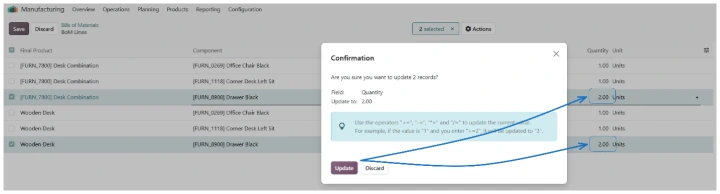
One change, all bills of materials updated.
Do you need to modify a component that appears in multiple bills of materials? Version 20 supports mass editing, allowing you to adjust quantities for all selected bills of materials at once. This significantly simplifies management, as you can make changes directly within the overviews without needing to use export/import functions.
Insight into the product structure
Bills of materials have always been easily accessible. Version 20 adds a great new feature: with a single click, you can jump from a bill of materials to all underlying components and sub-assemblies. This is particularly helpful when working with multi-level bills of materials.
Inventory at your supplier
Do you outsource your production? Starting with version 20, you can view the stock held by your subcontractor directly from the bill of materials overview. This allows you to see at a glance the availability of both your own components and those used by your subcontractor, so you know whether they can get to work without needing to call or email first.
Faster through the factory
In our next blog, we will discuss the innovations and improvements in optimizing lead times.
Curious about what Odoo 20 can do for your production?
Cravit is happy to think along with you. We show you which new features make a difference and how they can be deployed smartly. Contact us to discover what Odoo 20 can do for you.